How do I unsubscribe from your newsletter?Updated 8 months ago
We want our emails to be the highlight of your inbox, not the clutter. If you need to take a break or change how often you hear from us, we’ve made the process quick and transparent.
How to update your preferences:
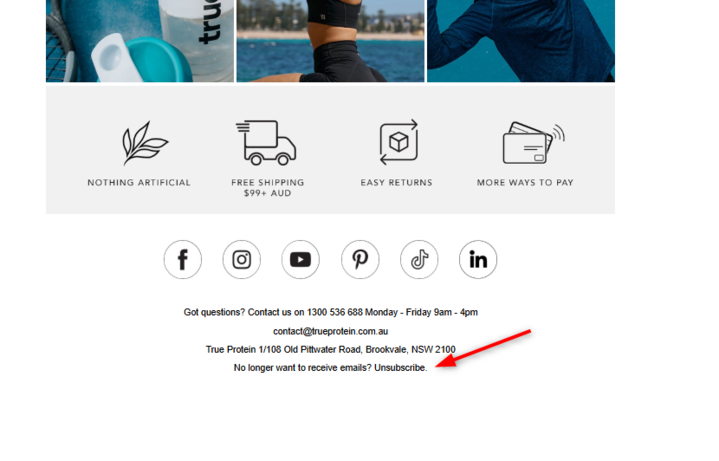
Open a True Email: Open any of our marketing or product announcement emails.
Find the Footer: Scroll to the very bottom and click the 'Unsubscribe' or 'Manage Preferences' link.
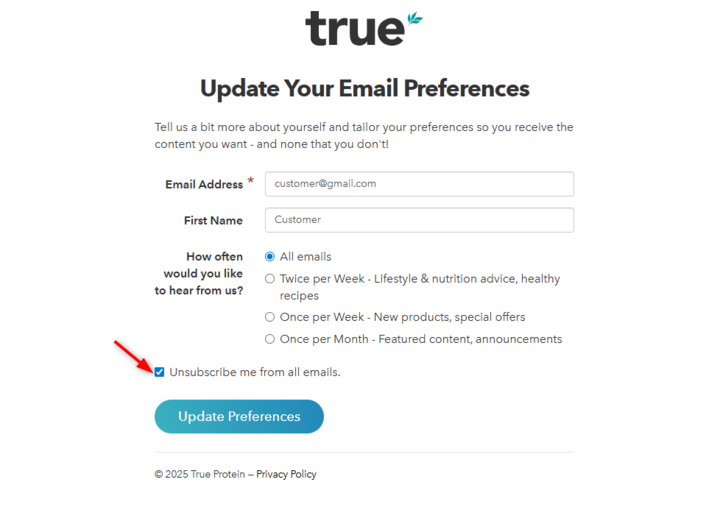
Choose Your Frequency: You don't have to say goodbye! You can choose to hear from us less often, or if you’re sure, tick the box to 'Unsubscribe from all marketing emails.'
What you will still receive: To ensure you stay informed about your purchases, you will always continue to receive essential service emails, including:
Order Confirmations
Shipping & Tracking Updates
Returns Processing Notifications
Having trouble?If the link isn't working or you'd like us to handle it for you, our Customer Experience team can manually update your status. Just reach out to [email protected] and we’ll take care of it.