How do I apply my discount code?Updated 6 months ago
Applying a discount code to your order is quick and easy. Follow the steps below to ensure your savings are applied before you complete your purchase.
How to apply your code:
Add items to your cart: Once you have selected your favourite True Protein products, click the cart icon and proceed to the Checkout.
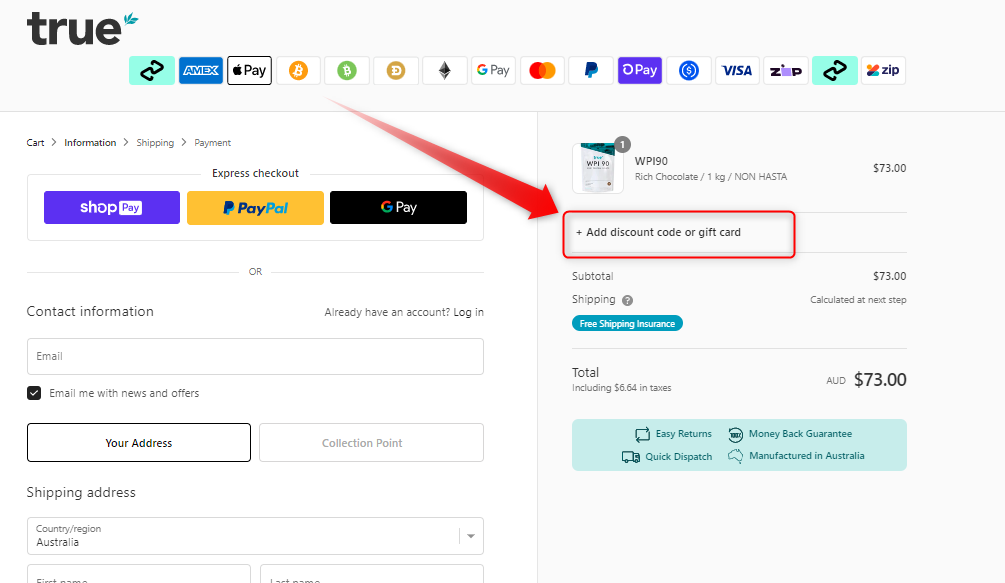
Locate the 'Discount Code' field:
On Desktop: You will find the "Discount code or gift card" box on the right-hand side of the screen, just above your subtotal.
On Mobile: You may need to click on "Show order summary" at the top of the checkout page to reveal the discount code input field.
Enter your code: Carefully type or paste your code into the box.
Apply the discount: Click the "Apply" button. You should see your order total update immediately to reflect the discount.